



|

Import and Export Tags & Labels via CSV

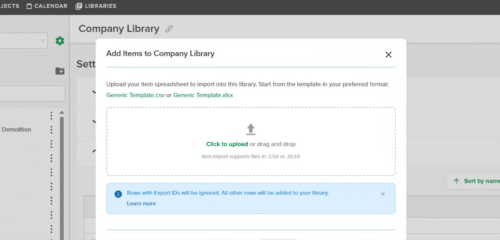
From the Tags & Labels tab on a project, users can now import a CSV to bulk-create Tags (or Labels) and their values, and export existing Tags (or Labels) to a CSV for reuse on other projects. The CSV format is a simple two-column layout, and the same format works in both directions — export from one project, import into another. For new projects with no Tags or Labels yet, the Export button returns a pre-filled template to get started.

For more information visit our Help Center

Stay up-to-date on all the latest STACK features!

Sign up for our Newsletter and get all the info right to your inbox.

Share

More Recent Updates

STACK_Release_TmbN_DisplayNegative

Visual Display of Negative Measurements

Measurements marked as "Count as Negative" now display a red circle with a minus (−) symbol on the plan canvas. The indicator appears for Area, ...
STACK_Release_TmbN_Hi-ResRender

Hi-Res Plan Rendering

A per-sheet Hi-Res Plan Rendering toggle that lets users render any plan sheet at higher resolution for crisper, more legible drawings when zoomed in. Turn ...
Tags and Labels Export and Import

Import and Export Tags & Labels via CSV

From the Tags & Labels tab on a project, users can now import a CSV to bulk-create Tags (or Labels) and their values, and export ...
Shopping Basket

Which solution are you looking for?

Takeoff & Estimate
Calculate everything you need anytime, anywhere.
Build & Operate
Seamlessly link your data from the office to the field.

Need a more custom solution?  Talk to us

STACK Training Videos

Select which training library you would like to access: