







Inside STACK: From the desk of Garrett Hume, STACK Senior Industry Consultant
When I was an estimator—and later a project manager—the biggest bottleneck wasn’t lack of information, it was repetition. We were constantly rebuilding the same takeoffs, reworking cost structures, and reorganizing estimates just to get a bid out the door.
Now, working with contractors across the industry at STACK, I see the same pattern all the time. Most teams slow down because they’re not fully using the ones they already have.
STACK has a number of built-in estimating features that can dramatically speed up your workflow, but many of them go underutilized. These are five I consistently recommend to contractors who want to move faster without sacrificing accuracy.
What are STACK Estimating Features?
STACK estimating features are tools within STACK’s Takeoff & Estimate platform that help contractors measure, price, and organize project scope more efficiently. In my experience, the teams that get the most value out of STACK are the ones that standardize their workflows using these features instead of rebuilding every estimate from scratch.
Why Estimating Still Takes Longer Than it Should
Across both my time in heavy civil construction and later managing federal programs, I saw firsthand how much time gets lost in the estimating phase. Not because the work is complex, but because the process isn’t standardized.
Industry data from the Associated General Contractors of America continues to highlight productivity challenges across construction, and estimating is one of the earliest places those inefficiencies show up.
At STACK, I regularly work with customers who are already using the platform, but once they start leveraging the features below, they’re able to take meaningful time out of every single bid.
1. How Can You Save 30–60 Minutes on Every Takeoff?
Use the Takeoff Library with project templates
One of the first things I ask contractors is: “Why are you rebuilding your takeoffs every time?”
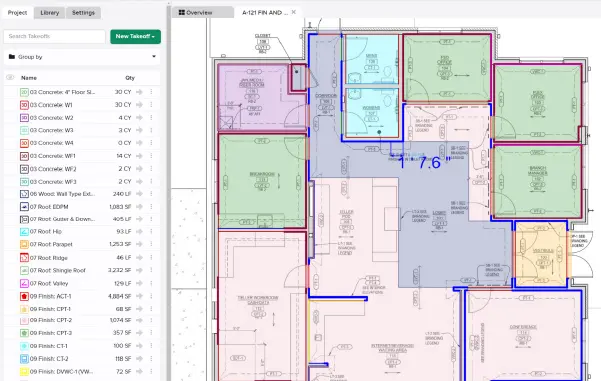
You don’t have to. With the Takeoff Library, you can save fully built takeoffs—including items and assemblies—and reuse them across projects. When you combine that with project templates, you’re essentially starting every job with your standard setup already in place.
Here’s how I recommend using it:
- Build a clean, standardized takeoff for a common scope
- Save it to your Takeoff Library
- Create project templates by trade or project type
- Apply both at the start of every new project
Instead of starting from zero, you’re starting from a repeatable system. From what I’ve seen working with STACK customers, this alone can save 30 to 60 minutes per project—sometimes more depending on the trade.
Takeoff Library
Project Templates
2. How Do You Eliminate Inconsistent Pricing Across Bids?
Use cost templates in the Estimate worksheet
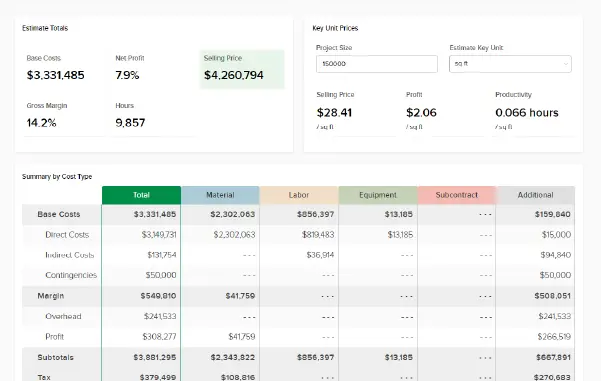
Earlier in my career, I saw teams copy old estimates just to reuse cost structures. The problem is, that approach introduces risk when small changes get missed, and inconsistencies creep in.
That’s where cost templates come in.
They allow you to standardize:
- Labor burdens
- Markups
- Equipment costs
- Indirect costs
My recommendation:
1. Define your standard cost structure once
2. Save it as a template in STACK
3. Apply it to every new estimate
4. Update it centrally when your costs change
This gives you consistency across bids without extra effort—and it reduces the chances of costly mistakes.
3. How Can You Stop Fighting Your Estimate View?
Use saved views in the Estimate worksheet
This is one of the most overlooked features I come across. Most users stick with the default estimate view even when it doesn’t match how they actually review a project. That leads to a lot of wasted time filtering and reorganizing data over and over again.
Saved views solve that.
I typically suggest setting up a few core views:
- A detailed estimator view (quantities, labor, cost breakdowns)
- A PM view (phasing and execution)
- An owner-facing summary
- A bid-day adjustment view
Here’s the process:
1. Customize your filters, columns, and groupings
2. Save the layout
3. Repeat for each use case
4. Switch between them instantly
It’s simple, but it removes a surprising amount of friction from the estimating process.
4. How Do You Organize Scope For Faster Bid Reviews?
Use tags and labels to structure your estimate
On more complex projects—especially in civil or multi-phase work—organization becomes critical. This is where tags and labels really stand out.
You can structure your estimate by:
- Phase
- Area
- Bid package
- Alternate scope
- Self-perform vs subcontracted work
In my experience, this becomes especially valuable during bid reviews and last-minute adjustments.
Here’s how I approach it:
- Define a tagging structure before you start
- Apply tags consistently during takeoff and estimating
- Use filters to isolate scope instantly
- Generate reports based on those tags
I’ve worked with teams who cut their review time significantly just by implementing a consistent tagging system.
Tags & Labels
5. Do You Really Need Assemblies For Every Estimate?
Use items-only takeoff for speed and simplicity
This is a big one. A lot of estimators assume they need to build assemblies for everything. In reality, that’s not always the most efficient approach.
With items-only takeoff, you can attach cost items directly to your measurements and generate a priced estimate right away.
I typically recommend this approach for:
- Smaller bids
- Simpler scopes
- Fast-turnaround work
Here’s how it works:
- Create your measurement
- Attach items directly (no assembly required)
- Apply pricing
- Move on
You can also store these as reusable entries in your Takeoff Library, which makes them even more powerful. From a workflow standpoint, this reduces setup time and helps you stay focused on what matters—getting to a reliable number quickly.
Assemblies vs Items-Only Takeoff: What’s the Right Choice?
Approach | Best Use Case | Speed | Complexity |
|---|---|---|---|
Assemblies | Complex, repeatable scopes | Moderate | High |
Items-Only Takeoff | Simple or fast bids | Fast | Low |
Hybrid | Mixed project requirements | Balanced | Medium |
How STACK Supports Compliance and Documentation
Having worked on federal contracts, I can tell you that documentation and traceability are critical. Beyond the estimate itself, keeping bid documents and project materials organized and accessible matters just as much — so nothing has to be hunted down weeks or months after the job is awarded.
STACK helps support this by providing:
- A clear audit trail of estimate changes
- Consistent cost structures
- Organized project documentation tied to your takeoff, with everything saved in one project so all users can view it
That level of visibility becomes especially important for teams working in regulated environments or on complex projects.
Final Thoughts: Speed Comes From Standardization
If there’s one takeaway from my experience—both in the field and working with contractors today—it’s this: You don’t get faster by rushing. You get faster by standardizing.
The contractors who estimate the quickest are the ones who:
- Reuse their best work
- Apply consistent cost structures
- Organize their estimates intentionally
STACK already gives you the tools to do this. The key is actually using them.

Garrett Hume
STACK Senior Industry Consultant
Garrett began his career as an estimator for a large heavy civil construction company in Northern Virginia, later advancing to project manager. He then transitioned to the federal government, managing complex contracts and programs. Garrett brings a strong background in project delivery, cost analysis, and operational efficiency across both public and private sectors.
FAQ
What is the fastest way to estimate in STACK?
In my experience, combining Takeoff Libraries, project templates, and items-only takeoff provides the biggest speed gains. It eliminates setup time and gets you straight to pricing.
How do cost templates improve consistency?
They ensure every estimate uses the same labor, markup, and overhead assumptions, which reduces variability and risk across bids.
When should I use assemblies vs items-only takeoff?
Use assemblies for complex, repeatable scopes. For simpler work, items-only takeoff is often faster and more practical.
Are saved views worth setting up?
Yes. They remove the need to constantly reconfigure your estimate layout, which saves time and reduces frustration.
How do tags help on bid day?
Tags allow you to quickly filter and adjust specific parts of your estimate, which is critical when making last-minute changes.