







- The construction estimating workflow is the financial foundation of every project—not just a preconstruction task.
- Most workflows break down between takeoff → estimate and estimate → ERP, causing rework and data inconsistencies.
- Disconnected systems force finance teams to reconcile data instead of analyzing performance.
- A connected workflow (drawings → takeoff → estimate → ERP) preserves financial accuracy and reduces risk.
- Tools like STACK and Velixo enable real-time data flow, turning Excel into an analysis layer—not a rework tool.
Construction projects succeed or fail long before crews mobilize on-site. The reality is simple: your construction estimating workflow is the financial foundation of every job—and if that foundation is fractured, everything downstream suffers.
Yet for many contractors, there’s still a disconnect between takeoff, estimating, and ERP systems. The result? Rework, unreliable forecasts, and finance teams stuck reconciling spreadsheets instead of analyzing performance.
In a recent Velixo virtual conference session, STACK highlighted how to eliminate these gaps and turn preconstruction into a true financial starting point. Here’s what contractors need to know—and how to fix the workflow.
What is a Construction Estimating Workflow?
A construction estimating workflow is the process of transforming project drawings into a structured financial model that guides budgeting, forecasting, and execution.
It includes takeoff (measuring quantities), estimating (assigning costs and production logic), and integrating that data into financial systems like ERP platforms.
Why Your Construction Estimating Workflow is the Financial Backbone of Every Project
Every construction project begins with a series of decisions:
- Should we pursue this job?
- What is the scope and risk?
- How will we build it?
These decisions feed directly into the estimate—which becomes the first financial model of the project.
That model defines:
- Cost structure
- Cash flow expectations
- Risk allocation
- Performance benchmarks
But here’s the catch: the estimate isn’t just a one-time exercise. As projects evolve—through addenda, change orders, and scope shifts—teams repeatedly return to the estimate as the source of truth.
At STACK, we have seen customers who treat estimating as a static step struggle with constant financial misalignment. In contrast, teams that treat estimating as a living, connected workflow maintain far stronger control over margins and outcomes.
Where Most Construction Estimating Workflows Break Down
Despite its importance, the estimating workflow is often fragmented. According to the Velixo session, two critical gaps consistently undermine financial accuracy .
1. The gap between takeoff and estimating creates data loss
In many workflows:
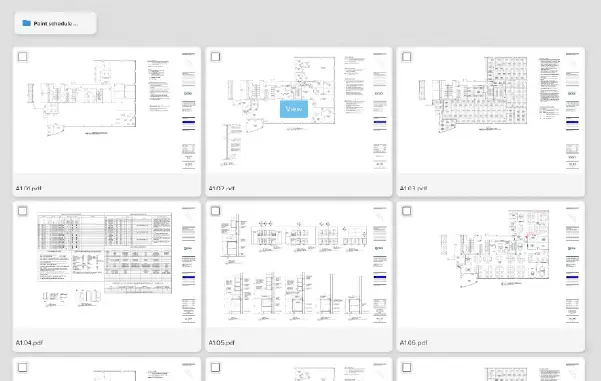
- Takeoff happens in PDFs or measurement tools
- Quantities are exported to spreadsheets
- Estimators rebuild logic manually
This breaks the connection between drawings and financial data.
Common consequences:
- Lost audit trails
- Assumptions hidden in spreadsheets
- Difficulty tracking changes across addenda
- Rework during every revision
Without structure, teams can’t answer basic questions like:
- Where did this quantity come from?
- What changed between versions?
2. Gaps between estimating and ERP create financial inconsistency
Once a job is awarded, the estimate must become a budget inside an ERP system like Sage Intacct or Acumatica.
But for many contractors:
- Estimates are exported into Excel
- Data is restructured manually
- Budgets are rebuilt for ERP import
By the time the data reaches the ERP, it often no longer resembles the original estimate.
The result:
- Forecasting restarts from scratch
- WIP reviews become reconciliation exercises
- Executives lose confidence in the numbers
Manual vs. Connected Estimating Workflows
Workflow Stage | Manual Process | Connected Workflow (STACK + ERP) |
|---|---|---|
Takeoff | Disconnected tools, PDFs | Cloud-based, drawing-linked takeoff |
Estimating | Spreadsheet-based, manual logic | Assembly-driven, structured estimating |
Data Transfer | Copy/paste, exports | Live integrations (STACK + ERP) |
Budget Creation | Rebuilt manually | Direct push to ERP |
Forecasting | Separate from estimate | Continuous, aligned with estimate |
How to Build a Connected Construction Estimating Workflow
To eliminate these gaps, contractors need a system that connects drawings → takeoff → estimate → ERP in a continuous flow. Here’s how that works in practice:
1. Start with drawing-connected takeoff
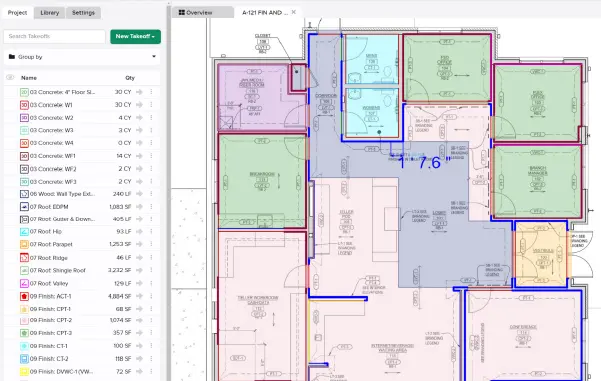
Use a platform like STACK Takeoff & Estimating to:
- Measure quantities directly from plan sheets
- Attach assemblies, cost codes, and production rates
- Maintain a live connection between drawings and data
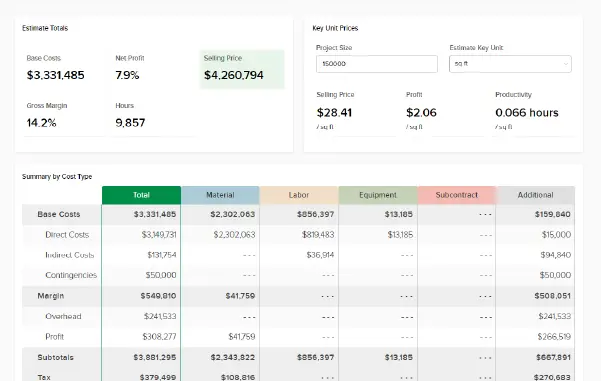
2. Build a structured estimate (not just a spreadsheet)
A modern estimate should include:
- Labor, material, and equipment costs
- Production assumptions
- Assemblies and alternates
- Cost codes aligned with your ERP
STACK customers in trades like electrical and concrete have reported that assembly-based estimating significantly reduces rework when scope changes mid-project.
3. Align estimates with ERP from the start
The key is ensuring:
- Cost codes match ERP structure
- Budget line items mirror estimate logic
- Financial data flows without translation and alternates
With native integrations like STACK + Acumatica or STACK + Sage Intacct, contractors can push estimates directly into ERP systems—no rebuilding required.
4. Use Excel as an analysis layer—not a rework tool
Excel isn’t going away—and it shouldn’t. The goal is to change its role.
With Velixo:
- Pull quantities from STACK into Excel
- Apply pricing, alternates, and adjustments
- Push structured budgets into ERP
- Pull actuals and forecasts back into Excel
This creates a governed, two-way workflow instead of a disconnected spreadsheet process. See how STACK customer ProFormance Builder Solutions scaled with STACK for Excel below:
How Integration Keeps Financial Truth Intact
When these systems are connected:
- Quantities stay tied to drawings
- Estimates reflect real construction logic
- Budgets match what was priced
- Forecasts update continuously
Instead of chasing data, teams gain clarity. At STACK, we have seen customers reduce hours spent on reconciliation and shift that time toward risk management and performance analysis—a major competitive advantage.
Why Construction Workflows Must Support Change—Not Resist It
Construction projects are inherently dynamic:
- Drawings evolve
- Scope changes
- Pricing fluctuates
- Change orders occur
Every change forces teams back through the estimating workflow. If your system isn’t connected, the data breaks—again and again.
But with a connected workflow:
- Updates flow automatically
- Estimates stay aligned with execution
- Financial data remains consistent
This is where platforms like STACK Build & Operate extend value into the field, ensuring teams always work from the latest information.
Compliance and Audit Readiness Start With Your Estimating Workflow
Disconnected workflows create compliance risks:
- Missing audit trails
- Inconsistent cost coding
- Poor documentation of changes
A connected system provides:
- Traceability from drawing to budget
- Consistent cost code alignment
- Clear documentation for audits
STACK’s audit trail capabilities help contractors maintain compliance with financial reporting standards and internal controls—especially critical for larger firms and regulated projects.
"STACK helps us in efficiency so you're not having to constantly spend time going to look for items It's right there at your fingertips. You've got the audit trail. It also helps for accuracy because if you're doing multiple homes of the same type and you're giving different takeoffs for different ones you can lose credibility to your customers. Being able to go and access that home that you've taken off or any kind of access for estimates then it just looks more concise more consistent for that audit."
ProFormance Builder Solutions
The Business Impact of Fixing Your Estimating Workflow
When contractors close the gaps in their estimating workflow, the results are measurable:
- Faster bid turnaround times
- More accurate budgets
- Improved forecasting accuracy
- Reduced financial rework
- Greater executive confidence
Most importantly, finance teams shift from defending numbers to driving strategy.
From Estimate to Execution, Continuity is Everything
The construction estimating workflow is no longer just a preconstruction task—it’s the foundation of financial performance.
When data breaks between systems, teams lose time, accuracy, and confidence. But when workflows are connected—from drawings to ERP—contractors gain a continuous flow of financial truth.
That’s the difference between reacting to problems and proactively managing projects.
This perspective comes from insights shared during a recent Velixo virtual conference session, “From Estimate to Execution: Activating Preconstruction as the Financial Starting Point,” featuring Jim Norton, CPA at Velixo, and David Fouché, Senior Product Manager at STACK. You can watch the full session here.
FAQ: Construction Estimating Workflow
What is the biggest problem with construction estimating workflows?
The biggest issue is data fragmentation between takeoff, estimating, and ERP systems. This leads to rework, inconsistent budgets, and unreliable forecasts.
How can contractors improve estimating accuracy?
By using integrated tools that connect takeoff, estimating, and ERP systems, contractors can maintain data consistency and reduce manual errors.
Why is Excel still used in construction estimating?
Excel remains valuable for flexibility and modeling. However, it should function as an analysis layer connected to live data—not a standalone workflow.
How does integration with ERP systems help?
ERP integration ensures that estimates flow directly into budgets without manual translation, preserving the original financial structure and intent.
Can estimating workflows handle change orders effectively?
Yes—if the workflow is connected. Integrated systems allow teams to update quantities, estimates, and budgets in real time as project conditions change.