






Selecting new construction estimating software can feel overwhelming. Every platform promises faster takeoffs, more accurate estimates, and improved collaboration. But how do you know which capabilities actually matter for your business?
The real answer starts further back than workflow, though. Workflow friction isn’t just an inconvenience. It’s hours of billable estimator time, missed bid deadlines, and lost margin on jobs you do win. Evaluating your workflow only matters because of what it costs (or saves) your business.
Before comparing features or scheduling demos, take a step back and identify where your estimating process creates the most friction. The biggest opportunities for improvement often aren’t obvious until you examine how your team works from bid day to project handoff.
Question 1:
Why does team size matter when choosing estimating software?
Team size shapes which estimating software features matter most. Solo estimators prioritize speed and simplicity, while growing teams need standardized assemblies, shared cost databases, and collaboration tools to keep estimates consistent as headcount increases.
Your team size influences far more than licensing costs. A solo estimator has very different priorities than a department with ten estimators spread across multiple offices.
As teams grow, consistency becomes just as important as speed. Without standardized workflows, each estimator develops their own assemblies, naming conventions, and processes. That inconsistency can make estimates harder to review, train, and scale. If growth is part of your business plan, then scalability should be a major evaluation criterion, not an afterthought.
Ask yourself:
- Are all estimators working from the same assemblies?
- Can multiple estimators collaborate on the same bid?
- Is everyone using the same cost database?
- How difficult is onboarding a new estimator?
Inconsistent processes create confusion and estimates that vary in accuracy depending on who built them, which directly affects win rates and margin predictability as your team scales.
"STACK is the best estimating software I have used. The learning curve is super short. My estimators were using STACK within 10 minutes of getting them logged in. STACK even has plenty of training videos and a dedicated helpline."
R3 Painting, Hampstead, NC
Question 2:
Why should takeoff and estimating software be integrated?
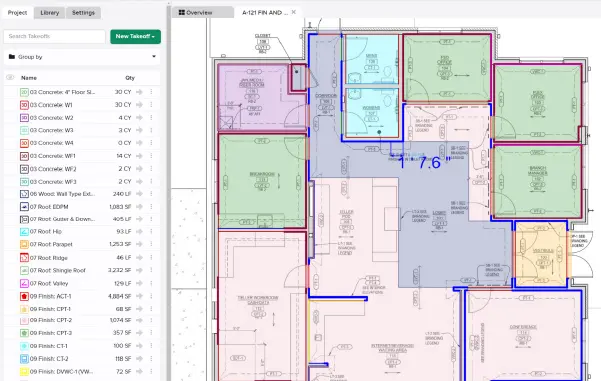
Integrated takeoff and estimating software automatically updates your estimate whenever quantities change, eliminating manual re-entry. This reduces errors, prevents version mismatches, and keeps bids accurate without duplicate work between separate tools.
This is one of the highest-impact questions you can ask. Many contractors still perform takeoff in one application before manually transferring quantities into Excel or a separate estimating program. That process creates unnecessary work every time quantities change.
Consider your current workflow:
- Do estimators re-enter measurements manually?
- Are quantities exported and imported between systems?
- Does updating a takeoff automatically update the estimate?
Every manual transfer introduces opportunities for errors, version mismatches, and lost productivity. An integrated workflow eliminates duplicate entry and helps ensure your estimate always reflects the latest quantities.
That lost productivity has a price tag. Every hour an estimator spends re-entering quantities is an hour not spent finding savings, refining pricing, or bidding the next job. On tight-margin projects, that difference can decide whether a bid is profitable at all.
"Using the prebuilt libraries we've set up in the platform with the Items & Assemblies attached, means once you start doing the takeoff, you start doing the estimate. The estimate is building as we're building that takeoff."
Elemex, London, ON
Question 3:
How should your estimating software handle plan revisions?
Strong estimating software carries existing takeoffs into revised plans, flags exactly what changed, and updates affected estimates automatically. This prevents missed scope and avoids restarting takeoffs from scratch after every addendum.
Few estimating tasks consume more time than managing addenda and revised drawings. Some teams restart their takeoff from scratch. Others rely on visual comparisons and hope they catch every change. Unfortunately, missed revisions often become missed scope and thus, missed profit. When evaluating software, look beyond simple overlay tools.
Ask whether the platform can:
- Carry existing takeoffs into revised plans
- Identify changed areas quickly
- Preserve previous work instead of requiring a complete restart
- Help estimators understand exactly what changed
Reducing rework during revisions can save hours on every project while improving estimate accuracy. Missed scope from a missed revision doesn’t just cost time to fix. It can mean eating costs mid-project or absorbing changes you never priced for, both of which hit the bottom line long after the bid is won.
“One of our largest estimates right now has over 3,000 pages in the drawings. So if we want to change one or two things we can just go in there and change the assembly and it changes hundreds of estimates at one time.”
ProFormance Builder Solutions, Winter Garden, FL
Question 4:
Why does estimate-to-project handoff matter?
A connected handoff sends estimating data directly into accounting, ERP, or project management systems after a bid is won. This eliminates duplicate data entry, reduces errors, and speeds up project startup.
Many contractors focus entirely on preconstruction while overlooking what happens next. If your estimating team manually rebuilds cost data inside accounting, ERP, or project management software after every award, you’re repeating work that’s already been completed.
A disconnected handoff creates:
- Duplicate data entry
- Higher risk of errors
- Project startup delays
- Lost estimating intelligence
Every one of these is a hidden cost. Startup delays push back revenue recognition, duplicate entry ties up staff hours that could go toward the next bid, and lost estimating intelligence means your team keeps re-learning lessons that should already be informing pricing.
Instead, look for platforms that connect estimating data directly with downstream systems so information flows naturally from bid to build. The less your team has to recreate, the faster projects can begin.
"We switched from PlanGrid to STACK because it allowed us to have one service for our bidding/estimating & field teams."
J&A Masonry, Dallas, TX
Question 5:
How do you choose estimating software that scales with your business?
Scalable estimating software supports more users, higher bid volume, and multiple offices without requiring a platform switch. Evaluate growth plans now to avoid replacing software again within a year or two. The software that works for one estimator today may become a bottleneck next year.
Whether you’re planning to hire additional estimators, pursue larger projects, or expand into new trades, your technology should support that growth.
Think about questions like:
- Will more estimators need access?
- Do you expect bid volume to increase?
- Will multiple offices collaborate?
- Are you entering new markets?
Buying for today’s needs alone often leads to replacing software sooner than expected. The cost of outgrowing a platform early is almost always higher than the cost of choosing the right one upfront.
"STACK lets us grow on the top end very fast. It's helped us grow to our max potential as we sit. I've got to keep up with STACK and not them keep up with me.”
Executive Flooring, Bentonville, AR
Common Workflow Gaps and Their Impact
Challenge | Daily Impact | What to Look For | Business Cost |
|---|---|---|---|
Manual quantity transfer | Duplicate work and higher error rates | Integrated takeoff and estimating | Lost estimator hours per bid; fewer bids completed per week |
Re-measuring plan revisions | Lost productivity on every addendum | Revision-aware takeoff workflows | Missed scope eaten as unbilled cost |
Multiple estimator processes | Inconsistent estimates | Standardized assemblies & libraries | Inconsistent win rates and unpredictable margins |
Manual project handoff | Re-entering won bid data | ERP and accounting integrations | Delayed project starts; delayed revenue recognition |
Desktop-only software | Limited collaboration | Cloud-native browser access | Slower bid turnaround; lost opportunities to faster-moving competitors |
Why Workflow Matters More Than Feature Lists
Many contractors evaluate estimating software by comparing feature checklists. While that can be a helpful starting point, it rarely tells the full story. Two platforms may both offer digital takeoff, estimating, and collaboration tools, yet the day-to-day experience can be dramatically different.
The real question isn’t whether a feature exists—it’s how well it fits into your workflow. Consider how many steps it takes to complete common estimating tasks, whether quantity changes automatically flow into your estimate, how the platform handles plan revisions, and whether multiple estimators can collaborate without creating version conflicts. It’s also worth thinking about the future. Will the same process still be efficient if your team doubles in size or your bid volume increases?
Looking beyond feature lists and evaluating how software supports your entire estimating workflow will give you a much clearer picture of its long-term value. In many cases, these workflow-focused questions reveal more about a platform’s impact on productivity than any comparison chart ever could.
Evaluate Your Estimating Workflow Before You Evaluate Software
The best software isn’t necessarily the one with the most features—it’s the one that solves your biggest operational challenges.
Before scheduling demos, identify where your current estimating process creates friction. Whether it’s manual data entry, plan revisions, inconsistent estimating practices, or disconnected project handoffs, understanding your priorities makes every software conversation more productive.
At STACK, we’ve seen contractors discover that the biggest gains don’t come from replacing one tool with another, they come from connecting their entire preconstruction workflow, reducing duplicate work, and giving estimators time to focus on winning profitable work.
Ready to Identify Your Priorities?
If you’re evaluating construction estimating software, start by identifying where your current process is costing you time, bids, or margin. Workflow friction is the symptom, lost profit is the real problem it’s pointing to. Answering these five questions will help you walk into every software demo already knowing what’s actually worth paying for.
Book a focused demo and bring this list with you. We’ll show you exactly how STACK addresses each one.
FAQ
What should I evaluate when comparing construction estimating software?
Focus on your workflow rather than feature lists. Consider team collaboration, takeoff-to-estimate integration, revision management, project handoff, and scalability.
Why is integration between takeoff and estimating important?
Integrated workflows eliminate manual data entry, reduce errors, and automatically keep estimates synchronized as quantities change.
How do plan revisions affect estimating accuracy?
Poor revision management increases the risk of missed scope, duplicate work, and inaccurate estimates. Software should help carry existing takeoffs forward and identify changes efficiently.
When should a contractor replace their estimating software?
If your team spends significant time re-entering data, rebuilding estimates after revisions, or struggling to collaborate, it may be time to evaluate more connected workflows.
How can I determine which software features matter most?
Start by identifying your current pain points. Understanding where your workflow breaks down makes it easier to prioritize the capabilities that will provide the greatest return on investment.