






Not every platform covers the same ground. Some focus on takeoffs alone, while others focus on PDF markup or AI-assisted measurement. The right software for your team depends on your preconstruction workflow, project types, and how much of the estimating process you want under one roof. Here’s how the top options compare and what to look for when choosing.
What Preconstruction Software Actually Does
Preconstruction software is built to handle the work that happens before construction starts. That includes quantity takeoffs, cost estimating, document management, and team collaboration. Instead of managing each of these in separate tools or spreadsheets, a software solution brings them into one platform so your preconstruction team can move faster and with fewer errors.
Who Uses It
Preconstruction tools aren’t just for estimators. Project managers, general contractors, and specialty contractors all interact with preconstruction data at different stages. An estimator might use a takeoff tool to pull material quantities from a plan set, while a project manager reviews the estimate for accuracy before it goes out as a bid. When everyone is working in the same platform, information doesn’t get lost between handoffs.
Why Generic Software Isn’t Enough
General-purpose project management software can handle scheduling and task tracking, but it usually falls short when it comes to the day-to-day work of preconstruction. Digital takeoff tools, cost databases, and estimating workflows have specific requirements that generic tools weren’t designed for. A dedicated preconstruction platform handles these natively, which means fewer workarounds and more time spent on actual estimating.
- Pro Tip: If your team is currently using a mix of standalone takeoff software and spreadsheets for estimating, track how much time gets spent transferring data between them. That’s usually where errors start and where a unified cloud-based solution pays for itself fastest.
Key Features to Look For in Preconstruction Software

Not all preconstruction software is built the same. When evaluating your options, focus on the key features that directly impact your preconstruction workflow and your team’s ability to produce accurate estimates faster. These are the capabilities that separate a dedicated preconstruction platform from a generic digital tool.
Digital Takeoff Tools
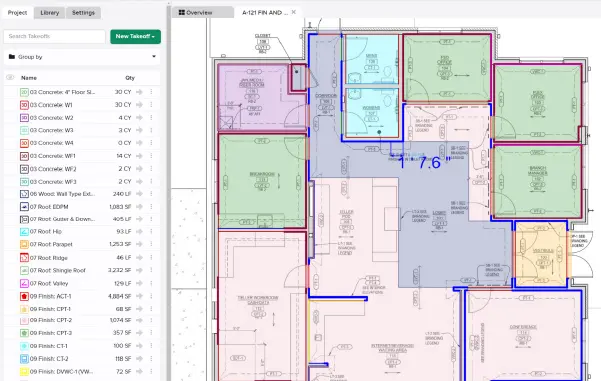
Digital takeoff tools are the foundation of any preconstruction platform. They let your team measure plans on screen instead of printing and scaling by hand. Look for a takeoff tool that supports multiple measurement types, handles large plan sets without slowing down, and lets you save assemblies for reuse on similar projects. The faster your takeoffs, the more time your construction team has for pricing and review.
Estimating and Cost Databases
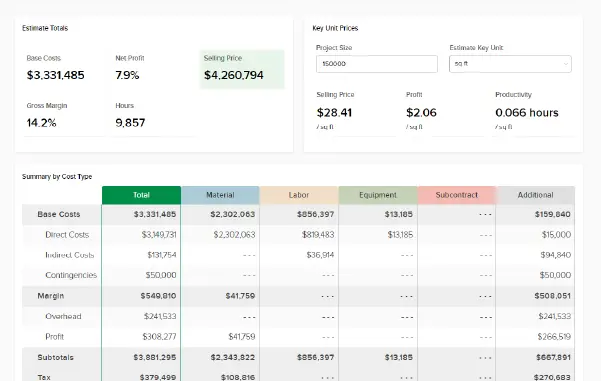
Takeoffs and estimating should work together, not as separate steps. The right software should let you connect your measurements directly to cost databases so material quantities flow into line items without manual data entry. Look for platforms that let you build and maintain your own cost libraries alongside industry pricing data and that support both unit cost and labor cost calculations.
Document Management and Version Control
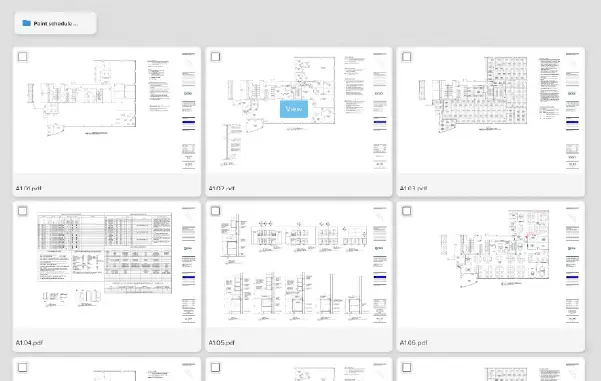
Construction professionals deal with a lot of plan revisions. Without proper version control, your preconstruction team could be working off outdated construction documents without realizing it. A strong preconstruction platform stores all construction documents in one place and makes it clear which version is current, so every team member is pulling from the same set.
Collaboration Tools and Real-Time Access
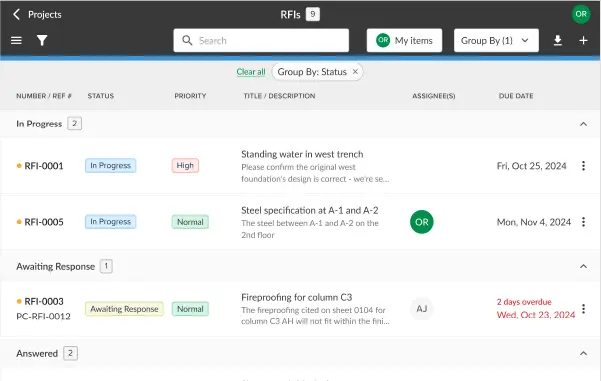
Preconstruction isn’t a solo effort. Your estimators, project managers, field team, and sometimes the general contractor all need access to project data at different points. Cloud-based collaboration tools let construction teams work on the same project in real time, regardless of location. That cuts down on back-and-forth emails and keeps everyone aligned.
Proposals and Bid Management
The estimating process doesn’t end when your numbers are done. Your preconstruction software should also help you turn that estimate into a professional proposal and manage the bid from submission through award. Look for features that let you build, customize, and send proposals directly from your estimate without exporting to another tool. The less time your team spends reformatting numbers into a bid package, the more time they have to review their work and pursue additional projects.
Pro Tip: Make a list of the features your team actually uses daily versus the ones that sound nice on a sales page. The best preconstruction software is the one that fits your day-to-day work, not the one with the longest feature list.
How STACK Compares to Other Preconstruction Software
Choosing the right software starts with understanding what each platform actually does well and where it falls short. Below is a side-by-side look at how STACK compares against four other tools that construction professionals commonly evaluate.

Why Preconstruction Teams Choose STACK
Most preconstruction teams don’t start with one tool. They start with several: a takeoff app, a spreadsheet for pricing, a PDF markup tool for reviewing plans, and email for everything in between. STACK replaces that stack of disconnected tools with one cloud-based platform built for the full preconstruction workflow, from the first look at a plan set through the proposal that wins the job.
One Connected Preconstruction Process
Everything connects. Takeoffs flow directly into your estimate. No re-entering material quantities, no copy-pasting between programs, and no measurements that live in one tool while the pricing lives in another. That single connected estimating process is what separates a dedicated preconstruction platform from a collection of digital tools duct-taped together.
Built-In Version Control
Your construction team works from the same page, literally. Built-in version control means every team member on the job is bidding off the current set of drawings, not last week’s revision. For a general contractor or project manager juggling multiple plan sets across projects, that kind of document management saves time and eliminates costly mistakes.
Cloud-Based Access for the Full Team
You’re not stuck at your desk. STACK is a cloud-based solution, so estimators, project managers, and field teams can access the same construction project from anywhere, on any device, at the same time. That real-time collaboration means fewer surprises and faster turnaround on bids.
From Estimate Proposal in One Platform
The estimate becomes the proposal. Build your numbers using integrated items, assemblies, and regional cost databases, then send a professional bid without exporting to a third tool and reformatting everything by hand. The less time your preconstruction team spends on formatting, the more time they have for accurate estimating and reviewing scope.
Preconstruction That Carries Into the Field
It doesn’t stop at the bid. STACK connects preconstruction to the construction phase through its project management and collaboration tools, so the data your team builds during estimating doesn’t get lost when the project moves to the field.
Other Preconstruction Tools on the Market
If you’re researching preconstruction software, you’ve probably come across a few of these names already. Here’s what each one actually does – and where the gaps show up once you get past takeoff.
PlanSwift
PlanSwift is a desktop takeoff and estimating tool owned by ConstructConnect. It’s been around for a long time and has a following among small to mid-size contractors who its customizable assemblies, drag-and-drop interface, and Excel integration. PlanSwift recently added AI-assisted takeoff features through its Takeoff Boost tools. As a Windows desktop application, it doesn’t offer the cloud-based access and real-time collaboration that STACK provides, which can be a limitation for teams working across multiple locations.
Bluebeam Revu
Bluebeam Revu is a PDF markup, measurement, and document review tool used across the construction industry. for plan review, annotation, and team collaboration through its Studio feature. However, Bluebeam is not a preconstruction estimating platform. It handles measurements but doesn’t connect those measurements to cost databases, line items, or proposals, which means your team still needs a separate estimating tool to get from takeoff to bid. Unlike STACK, there’s no way to go from takeoff to bid in one platform, so your team will need a separate estimating tool to complete the workflow.
On-Screen Takeoff (OST)
On-Screen Takeoff by On Center Software is a desktop-based takeoff tool built for estimators who want granular manual control. It offers condition libraries, overlays for comparing plan revisions, and measurement tools. Like PlanSwift, it has recently added AI-assisted features through Takeoff Boost. Estimating requires a separate On Center product (Quick Bid), so it doesn’t offer the connected takeoff-to-proposal workflow that STACK handles in a single platform.
Togal.AI
Togal.AI automatically detects, measures, and counts quantities from uploaded drawings, then lets your team review and adjust the results. It’s cloud-based and includes drawing comparison features. However, it doesn’t include built-in estimating, cost databases, or proposal tools, so your team would still need a platform like STACK to handle the rest of the preconstruction process.
Build a Stronger Preconstruction Process with STACK
The preconstruction phase is where your construction project takes shape. The software your team uses during that phase determines how fast you can bid, how accurate your estimates are, and how smoothly work transitions to the field.
The right preconstruction software should handle your core workflows without adding friction:
- Evaluate: Centralize drawings, search full plan sets, compare plan versions, and get your projects bid-ready.
- Takeoff: Measure drawings digitally with speed and precision using automated tools that cut hours off manual processes.
- Estimate: Leverage integrated items, assemblies, and regional pricing to build accurate estimates and send winning proposals.
STACK brings all of this together in one platform built specifically for construction teams. No more bouncing between disconnected tools and hoping nothing gets lost in the handoff.
Schedule a demo to see how STACK fits into your preconstruction workflow, or explore the platform to get started.