







Estimating is the backbone of a construction project, and it’s essential to get it right to win bids. After calculating material quantities with your takeoff, estimating adds costs to all facets of the project, from materials and labor to overhead and markup.
Like any process in construction, the estimating process is individualized to the company, but being siloed into one method of estimating can be burdensome. As you think through your estimating workflow, decide if it’s still serving you best, or if it might be worth exploring new options. For example, many companies find that they’re manually transferring data that could be easily automated to save time and reduce human error, and they might choose to keep their estimates within one platform with their takeoffs and items and assemblies for a single source of truth.
Other estimating departments have a detailed system within Excel or another construction estimating software and have their process down to a science, with no need to change what’s working great for them.
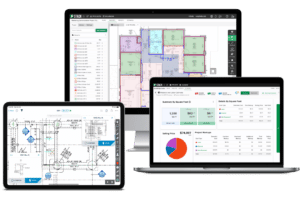
At STACK, although our recommended best practice is to keep your data in the STACK platform and create detailed estimates and proposals directly from your takeoff information, we recognize that not every estimator works the same way. We’ve incorporated multiple options for you to customize your estimating process while still taking advantage of our best-in-class takeoff tools. STACK works the way you need it to work for your business, whether you estimate in our platform or export to work in your current systems. We want you to succeed, and however your estimates need to be executed we are here with choices!
#1 Estimate in STACK
Because manually entering data from one tool to another can open the possibility of human error, our best practice is to generate your estimate within STACK. Our platform offers two types of estimates to cater to your business needs – Unit Cost Estimates and Material and Labor Estimates.
Estimate Worksheet – STACK’s new estimating worksheet allows your team to work horizontally – to view material and labor for each estimate item, all at a glance. With more flexibility to adjust numbers, groupings, and views, your team can estimate your way, developing the most accurate cost estimate possible while reviewing and adjusting markups and more to produce the best overall estimate for the job.
Unit Cost Estimate – Gives you the ability to add a per square foot, linear foot, each, or cubic yard price to measurements. Waste and overhead can also be added to arrive at the project cost. A unit cost estimate uses the measurements from each takeoff. This type of estimate allows you to assign pricing per square foot, linear foot, cubic yard, or count (as well as waste, overhead, and other non-measured costs).
Material and Labor Estimate – This option offers a much more detailed estimate using materials derived from items or assemblies. Materials and labor estimating gives you the ability to edit item pricing, add waste, and add overhead to arrive at a project cost. A material and labor estimate uses materials from items and assemblies that are attached to takeoffs. This yields a far more detailed estimate when compared to a unit cost estimate as you can assign a cost and waste to each material, along with overhead for the project.
STACK also offers the ability to create multiple estimates per project for alternate bids. When you have calculated your selling price and profit, you’ll be able to create a custom, professional proposal within STACK!
#2 Seamless Excel Integration: STACK for Excel
If your estimating process lives in Excel, there’s no need to start from scratch. Now you can supercharge it with STACK for Excel. This new plug-in from Velixo lets you connect your STACK takeoff and estimating data directly to your existing spreadsheets, so your quantities, costs, and labor rates update automatically without tedious exporting or manual entry. You’ll keep the flexibility and familiarity of Excel, but gain real-time accuracy, faster iterations, and effortless syncing with your STACK projects.
With STACK for Excel, you can continue using the templates, formulas, and financial models your team trusts. Only now, they’re powered by live STACK data. That means no more version confusion or disconnected workflows, just one streamlined process from takeoff to final estimate.
#3 Export Takeoff & Estimate Reports from STACK
If you already have an estimating tool you’ve been using successfully, you can still get the benefits of STACK’s fast, accurate takeoffs and then export takeoff reports for import into your system to create your estimate. Or, if you have construction estimating software you prefer to generate your own proposals from, you can build your estimate in STACK and access your data elsewhere using our estimate filters and reports.
Our exportable reports offer over 30 different estimating-centric data points for each item, including:
– Item details, such as accounting code, name, description
– Takeoff data, such as takeoff name, unit, cost type, quantity, purchase unit and associated assembly
– Cost, including wastage by quantity and percentage, adjusted quantity, unit cost and measured quantity
– Markup and tax broken down by overhead amount, overhead percentage, line-item markup amount, line-item markup percentage, total markup, selling price, tax percentage, tax amount and selling price with tax
– Any labels and project plans associated with the estimate line item
– Overall financial metrics including gross margin percentage, net profit amount and net profit percentage
Using these rich data sets, you can take an estimate from STACK and export it into Excel or another tool, then import that spreadsheet into an additional system like Sage or QuickBooks to create proposals your way.
#4 API
This new feature is coming soon to a cloud near you! There is SO MUCH data in STACK. We understand you want to share that data in your other systems. Instead of time-consuming, manual processes like using Excel or the plug-in to pull data individually, you can do it through an automated integration between STACK and your estimating tool. STACK’s Application Programming Interface, or API, is a compilation of programmatic functions software developers can use for extracting estimating data from STACK.
You can “ask” the API to give you a list of all STACK estimates, provide all line items and details, etc. That data will go directly into your other system, creating a streamlined integration that will empower your team. You can also populate STACK automatically with leads and plans uploaded from your own website and populate STACK estimates with prices from your ERP system. The API gives you the ability to pull proposal and quote documents out of STACK to store in your CRM, or send directly to a prospective customer. Additionally, you can extract estimate line-item quantities and prices to archive or analyze in another system.
STACK is here for you, your way. We are constantly working to improve our system and add features that make sense for your business and workflow. With four different ways to estimate, we are confident you’ll love using our cloud-based software to get your data where it needs to be! Create your free account today!
Bid Faster. Win More. Build Smarter.
Get your FREE account today to:
- Increase Team Efficiency
- Complete Estimates Faster
- Generate More Revenue