







The STACK IQ prompts estimators use most aren’t flashy. They’re “find me that project,” followed by “now walk me through the estimate.” Estimators reach for AI first to skip the clicks they make 50 times a day.
That’s good news if you’re just getting started. You don’t need a clever prompt. You need the one you’d otherwise spend four clicks on.
Here’s what those prompts look like, what customers say about them, and how to write your own.
What Is STACK IQ?
STACK IQ is STACK’s conversational AI capability that connects your STACK account to AI assistants like Claude, ChatGPT, and Cowork so you can find projects, review estimates, edit takeoffs, and build documents by describing what you need in plain language. It works inside your real STACK data instead of a copy you paste into a chat window. STACK IQ is included for every STACK customer on every subscription level at no additional cost.
Estimators Start Where AI Pays Off Fastest
Contractors aren’t experimenting with AI anymore. A survey of more than 1,000 construction leaders found that 38% of contractors now see measurable business impact from AI, up from 17% the year before (Roofing Contractor). The same report lists cost estimation (24%) and bid management (22%) as the leading uses.
Estimating is where contractors start, and STACK IQ users follow the same path. The prompts below come from the list STACK uses in customer workshops, plus customer prompts, grouped by the kinds of work estimators reach for first.
Most STACK IQ Prompts Are Lookups – and That's the Point
The first prompt almost every estimator runs is a lookup: find a project, pull its takeoffs, check a detail.
That sounds modest until you think about bid week. A supplier is on the phone, the GC just moved the bid date, and someone in the field wants to know if the east wing ceilings made the takeoff. Every one of those questions starts with opening STACK and drilling down. A lookup prompt skips straight to the answer – and it can answer questions about your whole portfolio that would take a spreadsheet to build by hand.
Prompts to try:
- "Give me a list of my STACK projects."
- "Group my projects by status and show the total value of each group."
- "What's the selling price of each estimator's projects?"
- "Who are the owner and architect contacts on [project]?"
- "What drywall products does the STACK library have? Start with the main types."
You don’t need the exact project name. If more than one project matches, STACK IQ asks which one you mean.
The line worth remembering: the best first prompt is the question you already ask your coworker across the room.
Estimate Review Is the Second Habit Estimators Build
Once lookups feel routine, estimators move to review. The sequence is natural: find a project, then ask what’s in the estimate and what’s wrong with it.
This is where AI earns its keep on bid night. A second set of eyes afterhours is hard to find. A prompt that flags gaps before you submit is easy.
Prompts to try:
- "Walk me through the [project] estimate."
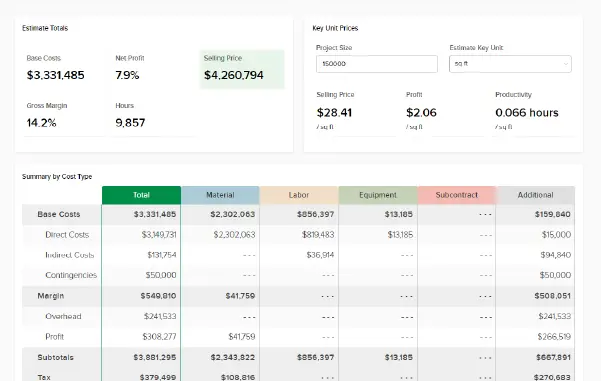
- "Break down [estimate] by takeoff. Show me the top 3 cost drivers."
- "Run an audit on the [project] estimate."
- "Act as a skeptical senior estimator. What are the three biggest risks in the [project] bid?"
- "Does any single line item make up more than a third of an estimate?"
- "[Project] has two estimates. What's different between them?"
Estimators who make review a habit say it catches what tired eyes miss:
"It's totally making my job easier, faster, and the outcomes better, as it's more capable of catching errors, checking math, and missing items than I ever could be."
Erik King, Legacy Enterprises
Turner Brothers sees the same thing on every bid:
"Using STACK IQ we have also been able to identify discrepancies in estimates, be it missing takeoffs, unit rates that are out of whack, etc."
Evan Borseti, Turner Brothers
STACK IQ reads, drafts, and flags. You decide what’s right. Ask it to list its assumptions separately from its findings, and the review gets faster to verify.
Bulk Takeoff Edits Are Where One Prompt Replaces an Afternoon
Some estimators leverage STACK IQ for a single tedious job: cleaning up takeoffs.
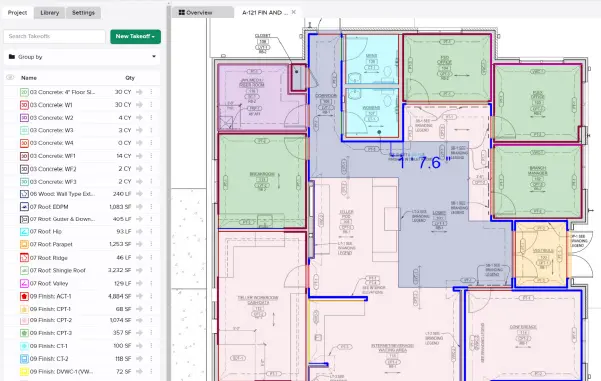
Here’s why it matters. Takeoff colors aren’t decoration – they’re how a team reads a plan sheet at a glance. Copy takeoffs from another project and you inherit its colors along with its assemblies, so you can end up with six shades of blue that look identical on a laptop screen at midnight. Recoloring 80 takeoffs by hand is the job that gets skipped. A prompt does it in one pass, and STACK IQ confirms before it applies the change. Erik King at Legacy Enterprises takes it a step further: he tells STACK IQ he’s viewing takeoffs on screen and asks for colors that look distinctly different there.
"One nice feature that I recently discovered was the ability to have Claude go in, copy takeoffs, and color code them to different colors that differentiate so that I don't have to go in and do it. That saves me 15 minutes or so on certain projects."
Erik King, Legacy Enterprises
Prompts to try:
- "Recolor all takeoffs tagged 'Alternate' to orange on [project]. Before you change anything, remember the original colors so we can revert."
- "Color-code the takeoffs on this project by type: walls in blue, ceilings in green, flooring in gray."
- "Copy this project's takeoffs into a new library."
Two Tips: Always ask STACK IQ to remember the original state before a bulk change, and when you copy takeoffs into a library you just created, say so, since STACK IQ works from a snapshot of your data.
Take-Action Prompts Turn an Email Into a Project
Bid boards go stale fast. If yours has ever said “Due Friday” for a job that moved to Tuesday, you know why quick setup prompts matter: change a bid date, update a status, or add a note without hunting for the right screen.
Customers are now chaining these prompts with their inbox. With STACK IQ and an email connector in the same AI assistant, an invitation to bid can become a STACK project without retyping a single field.
"It certainly saves time to have Claude integrated with both STACK and Outlook so it can go into my email, pull pertinent details and create a new project for me. It's an incredibly simple process as long as you know how to be specific enough for an AI to follow your instructions and actually wind up with the result you wanted."
Selena Dunham, Level Pro Construction
Erik King built the same workflow around Gmail, and he describes it step by step:
"One of the things that I've already started doing is: Using STACK IQ to search my Gmail inbox. Extract the emails which need to be entered as jobs into STACK. Build the job for me so that it already has all of the info fields populated and the take-offs built."
Erik King, Legacy Enterprises
Prompts to try:
- "Create a sandbox project for me, using my name. Set the bid date two weeks from today at 5pm Eastern."
- "Add a few takeoffs to that project, like the ones in [project]."
- "Add a note to [project] saying the estimate needs pricing before it can be bid. Sign it with my name."
- "Check my projects for missing or inconsistent setup information before I bid."
Start with a sandbox project. A sandbox project is a practice project you create in STACK just for testing – no real bid, no real client, and no live numbers at risk. It’s a regular STACK project, so prompts behave exactly as they would on a live job, but if STACK IQ misreads an instruction, nothing that matters changes. Use it to learn how STACK IQ reads your instructions before you point it at a live bid, and give it a name that makes the purpose obvious, like “Sandbox – [Your Name],” so nobody on your team mistakes it for real work.
One Estimate Becomes the Bid Summary, the Proposal, and the Talking Points
The highest-value STACK IQ prompts turn numbers into documents. One estimate can become a customer-facing proposal, a one-page summary for the owner, and talking points for a tough pricing call – without re-keying, and without the drift that creeps in when the same numbers live in three files.
"STACK IQ allows us to produce estimates, proposals, and budgets based off one prompt. It's revamped our formatting and legibility of documents from 'similar per project' to identical and repeatable. With multiple projects being bid each week, consistency is key."
Evan Borseti, Turner Brothers
"We're currently testing the use of Claude to create our master proposals, which is now possible through STACK IQ."
Adam Roark, Gulf Coast Pavers
Prompts to try:
- "Write a one-page bid summary for [project] that I could send to the owner."
- "Create a customer-facing PDF proposal for [project]."
- "Summarize [project] in five bullets I could read out to a CEO."
- "Draft three talking points for a call with the [project] customer about why the number is what it is."
Based on what STACK customers report, this is where time adds up. Turner Brothers puts its savings at 30 to 40 minutes per bid and proposal.
One Customer Turned a Week of Estimating into 11.5 Hours
Small prompts add up. When an estimator chains lookups, setup, review, and documents together, a week of work can shrink to a day and a half. Erik King at Legacy Enterprises connected Claude to STACK IQ, his email, and his team’s forms tool, then put the whole chain to work on a complex job:
"I did a job last Friday. It was a 289-unit apartment building with a lot of complicated factors that, in the olden days, would have taken 4 or 5 days to do. But doing it the new way, I did it in 11.5 hours total. By my estimation, we saved about 75% of the time formerly required for a complex project like that."
Erik King, Legacy Enterprises
How to Write STACK IQ Prompts That Hold Up on Bid Night
Good STACK IQ prompts follow the rules you’d give a sharp new hire in their first week:
1. Name the project and the job. “Run an audit on the [Project] estimate” beats “check my estimate.”
2. Give it a role or an audience. “Act as a skeptical senior estimator” or “in five bullets I could read to a CEO” changes what you get back.
3. Ask for a report before a change. Before any bulk edit, have STACK IQ list what it plans to change. Read it, then approve.
4. Have it remember the starting point. For anything you might want to undo, tell STACK IQ to remember the original state first.
5. Save the prompts you repeat. Turn a recurring audit or proposal into a custom skill in your AI assistant so the whole team runs it the same way.
There’s a reason step 3 is on the list. Quantities are data. Estimates are commitments. STACK IQ can find, format, and flag faster than anyone, but the number you sign your name to is still yours. Erik King, whose team uses STACK IQ daily, puts it plainly:
“My experience is that AI in general and STACK IQ specifically are hugely useful tools that don’t replace us and which don’t begin to have the power and usability to genuinely replace our years of experience.”
– Erik King, Legacy Enterprises
What STACK IQ Prompts Can't Do... Yet
Knowing the limits saves you from writing prompts that won’t work. Today, STACK IQ can read your projects, takeoffs, estimates, and library items; create projects and add takeoffs; update a project’s name, status, bid date, and notes; recolor and copy takeoffs; build proposals, summaries, and other documents; and flag missing prices, mis-tags, and stale snapshots.
It can’t yet read plan sheets or graphics, upload plans, delete projects or estimates, or write changes back into an estimate. Some of these are on the near roadmap, though timing isn’t set. If you want AI that reads plan sheets directly, look at STACK’s AI Takeoff, which generates a first-pass takeoff on doors, walls, symbols, and more from an architectural floor plan for an estimator to review.
How to Connect STACK IQ and Try These Prompts
You need an active STACK subscription and a Claude or ChatGPT account, and STACK IQ is included with current STACK subscriptions. Here’s how to connect in Claude:
- In Claude, go to Customize, then Connectors, add STACK, sign in, and authorize.
- In ChatGPT, go to Plugins, add STACK, and sign in.
- In any other assistant that supports MCP, add a custom connector using the STACK IQ connector URL on the STACK IQ page.
- Run a lookup first. Ask for a project you know well so you can check the answer against what you already see in STACK.
Conclusion: The Best STACK IQ Prompts Start Small
The STACK IQ prompts estimators actually use are lookups, estimate audits, takeoff cleanup, and bid-board updates – the small jobs that eat bid week one click at a time. Start with the question you already ask most. Ask for a report before every change. Keep the final number in your own hands.
“I can already clearly see that STACK IQ will be able to work behind the scenes for me and do a lot of the tedious parts of our job for us while we focus on the things that really do need our expertise.”
– Erik King, Legacy Enterprises
Once lookups feel routine, let one estimate become the proposal, the owner summary, and the talking points. See how STACK IQ works and run your first prompt tonight.
Frequently Asked Questions about STACK IQ
Most estimators start with project lookups, like listing projects or pulling a project’s takeoffs. Estimate reviews usually come next, followed by bulk takeoff edits, project setup updates, and document prompts like proposals and bid summaries.
Yes. STACK IQ can create a project, set its bid date, and add takeoffs. Paired with an email connector in Claude, customers use it to turn a bid invitation into a STACK project without retyping the details
Not yet. STACK IQ can read estimates, audit them for missing prices and mis-tagged items, and build proposals and summaries from them, but writing changes back into the estimate isn’t available today.
Name the project and the task, give it a role or audience when it helps, and ask for a report before any change. For bulk edits, have STACK IQ remember the original state so you can revert.
No. STACK IQ is available to all STACK customers at every subscription level at no additional charge, and it works with Claude, ChatGPT, and other assistants that support MCP connectors.