




|
/

What's New?

Discover the latest product feature releases, improvements, and updates in STACK Build & Operate.

/

View More Takeoff & Estimate Information

It's now faster and more seamless to upload information into Build & Operate, allowing the field team so easily access of all the work completed ...

Streamline Upload

The new Streamline Upload feature provides a unified process for adding project files. You can ...

Move Files and Folders

You can now move files and folders within your project, making it easier to reorganize ...

Revision Status Information

We’ve introduced a new Revision Status Information feature to give field teams greater visibility and ...

Sync Status Information

We’re introducing a new Sync Status Information feature that gives field users better visibility and ...

Project Copy & Move Feature

We’re excited to introduce the Project Copy & Move feature, designed to help businesses seamlessly ...

New Upload Options for Drawings and Documents

Stay organized and keep your projects moving with effortless file management using our newly added ...

PDF Report Header Adjustments for Workflows

STACK | Build & Operate has updated the Workflows PDF Report Export for a cleaner, ...

Upload Photos and Documents to Workflows

You can now upload photos and link documents not only from your iPad and computer ...

Attach Files to Workflows

You can now attach files directly in the Related Items section of your workflows. This ...

SmartUse Has a Whole New Look While Maintaining Its Same Great Features

SmartUse, the construction branch of STACK, has a whole new look while keeping all its ...

Workflows on iPhone

Workflows are now available on the iPhone App. They have all the same functionalities as ...

Addition of Project Template

Project Templates have been added to allow Administrators to design multiple templates tailored to different ...

Workflows: Additional Information

An Additional Information section has been added to Workflow Details to allow workflow type managers ...

Workflows: History

History provides an audit trail for each workflow item, detailing who did what and when. ...

Workflows: Configurable Statuses

General Contractors and subcontractors can now change the status of customized workflows in the project ...

Workflows: Email Configuration

You can now set email configurations for each of the Workflow types in the Project ...

Workflows: Download PDF with Plan Attached

When downloading a PDF of a Workflow, if a plan is attached to the workflow, ...

Custom Fields in Issues CSV Download

Three columns have been added for the Custom configurable fields in the download of the ...

Daily Reports on iPhone

Daily Reports are now accessible on iPhone. The STACK Build & Operate App on phone ...
/

View More Takeoff & Estimate Information

It's now faster and more seamless to upload information into Build & Operate, allowing the field team so easily access of all the work completed ...
/

Streamline Upload

The new Streamline Upload feature provides a unified process for adding project files. You can upload drawings (PDF only) and ...
/

Move Files and Folders

You can now move files and folders within your project, making it easier to reorganize your workspace as your job ...
/

Revision Status Information

We’ve introduced a new Revision Status Information feature to give field teams greater visibility and confidence when working on projects—especially ...
/

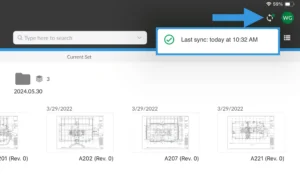
Sync Status Information

We’re introducing a new Sync Status Information feature that gives field users better visibility and confidence when working on their ...
/

Project Copy & Move Feature

We’re excited to introduce the Project Copy & Move feature, designed to help businesses seamlessly transfer project data across organizations. ...
Shopping Basket

Which solution are you looking for?

Takeoff & Estimate
Calculate everything you need anytime, anywhere.
Build & Operate
Seamlessly link your data from the office to the field.

Need a more custom solution?  Talk to us

STACK Training Videos

Select which training library you would like to access: